Apple Intelligence: Promising, but still has a lot to learn

Add Axios as your preferred source to
see more of our stories on Google.
/2024/09/20/1726802049767.gif?w=3840)
Illustration: Shoshana Gordon/Axios
Apple Intelligence's first-wave features, released Thursday, offer only modest improvements that left me excited for the future, but also impatient for it.
Why it matters: AI features are shaping up as a key differentiator in choosing a smartphone or computer, and Apple, despite a late start in consumer AI, has an opportunity to be a winner.
Driving the news: Apple made the new AI features available as part of the public beta of iOS 18.1. The key elements are:
- summaries within e-mails and notifications;
- an image Clean Up feature, for removing unwanted objects from photos;
- and a set of writing tools that use generative AI to proofread and improve written text.
Apple's overall strategy is to combine the power of generative AI with the vast amount of personal information on one's device, all while preserving users' privacy.
- It's an appealing approach, but the first go-around of Apple Intelligence offers just a glimmer of that broader vision.
- That's not too different from my take on the AI features Google built into this year's Pixel 9 phones.
Zoom in: I took time to play around with each of the Apple Intelligence features that are now available.
Clean Up
Apple's Clean Up — similar to Google's Magic Eraser and other tools — lets you remove distracting people and objects from pictures you have taken.
- I found the feature worked smoothly and easily. The emphasis is on simplicity, so you don't get much fine-grain control of the effect. But I think most people will be happy with that trade-off.
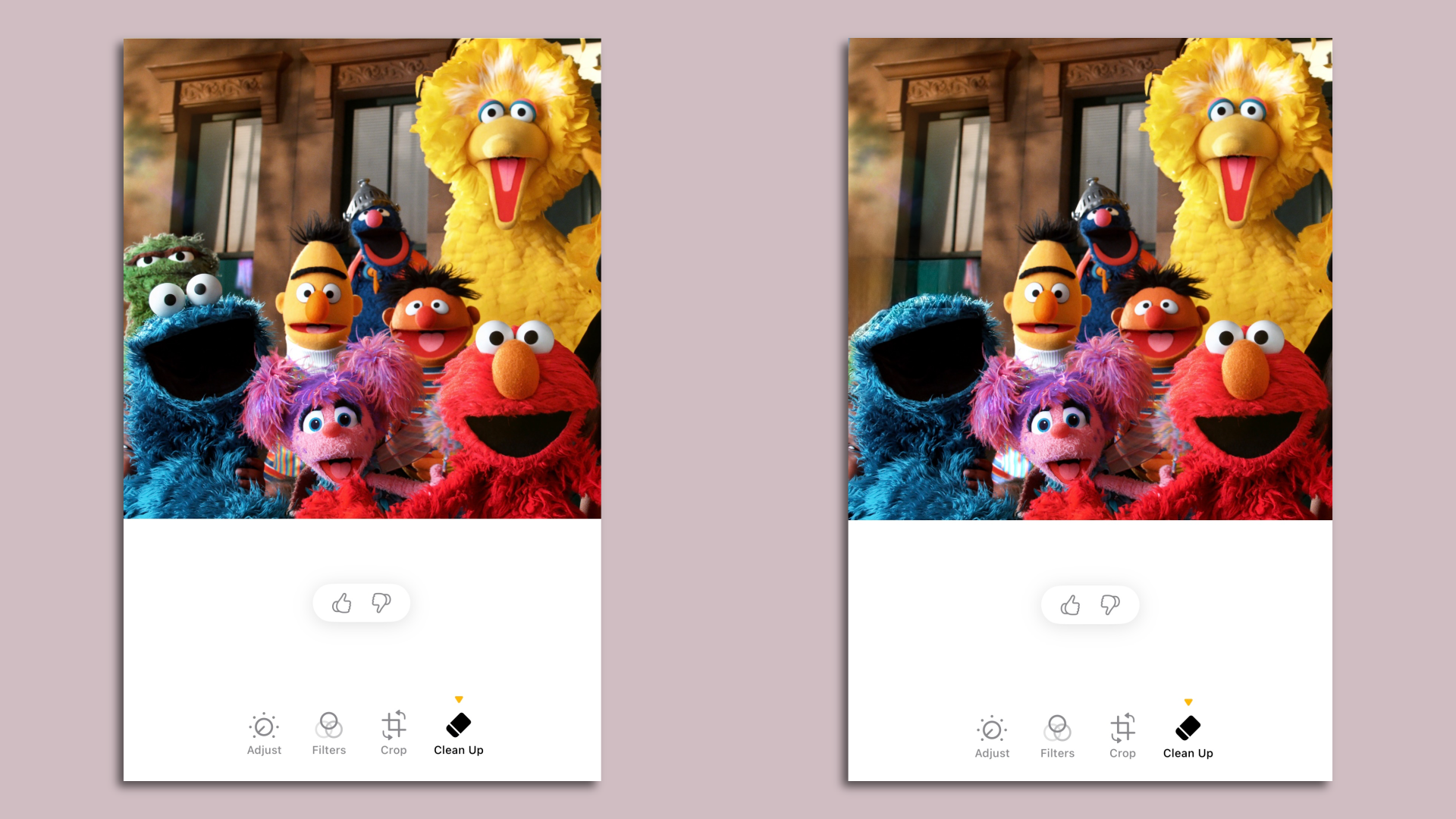
- That said, when I tried to remove Oscar the Grouch from a group photo of "Sesame Street" characters, Clean Up removed Cookie Monster's eyes as well.
- If you use Clean Up on a photo, Apple adds a note in the photo's metadata. Apple has yet to join any of the broader cross-industry initiatives to track AI-made changes in photos, such as the Adobe-led Content Authenticity Initiative.
Writing tools
Apple offers three AI-assisted options: proofread, rewrite and summarize. With rewriting, Apple offers a few additional choices, such as making the text more professional or friendlier.
- To test the features, I asked Apple Intelligence to take a look at the Declaration of Independence. The proofread tool suggested that the Founding Fathers were good grammarians, offering no specific changes.
- It summarized the text thusly: "The Declaration of Independence proclaims the 13 British colonies' separation from Great Britain, citing King George III's tyranny and repeated abuses of power. It asserts the colonies' right to self-governance and independence, and pledges the colonists' lives, fortunes, and sacred honor to support the cause. The Declaration also appeals to the international community for support and recognition."
- Sadly, when I asked for a rewrite in a friendlier tone, the software replied, "Writing tools aren't designed to work with this type of content."
E-mail summaries
Apple Intelligence summarizes e-mail in two different ways.
- The first, which appears when you're looking at a list of messages, offers a summary of each message in place of the customary display of the first lines of text.
- A second feature allows you to open a particular e-mail or thread and get a summary of the message or messages.
- I tend to use the mobile version of Microsoft Outlook rather than Apple's mail program to read my work email. But my brief test of Apple's summarization features tempted me to give Apple Mail another try.
Siri
The AI-powered Siri improvements I'm most excited for are all in Apple's "still to come" bucket.
- For now, the changes are relatively modest. Users can now type to Siri as well as talk to it. Siri is better able to handle stumbles in speech, and it has more knowledge on how to access features within Apple products.
- None of these elements are game-changers for me.
Transcripts of calls and voice memos
Google has offered the ability to transcribe voice recordings for a while, while both Google and Apple this year are adding the ability to directly record phone calls (with a notification to other call participants).
- I already use Otter to record and transcribe a ton of meetings and calls. Apple's features are more limited than Otter's capabilities, but Apple doesn't charge, while Otter and other third-party services are paid or freemium.
- Apple's feature also works on voice memos you have recorded previously, so I tested it out on some audio of Marc Benioff speaking at Dreamforce. It performed at least as well as many other systems I've tried — though it did struggle with names, including Benioff's.
Yes, but: As we've written, some of the most far-reaching — and fun — elements of Apple Intelligence are still to come. Some will be delivered later this year, while others aren't promised until the first half of 2025.
- I suspect the text-to-picture Image Playground and Genmoji features will be popular.
- Potentially more groundbreaking is the ability to use Siri, as Apple demonstrated in June, to perform more complex tasks — working across multiple applications or handling matters with an implicit understanding of your personal information. That's the Siri upgrade I want.
- Apple has said two features that are on track for this year are Visual Intelligence (an iPhone 16-only feature somewhat similar to Google Lens) and ChatGPT integration — which will allow people to use OpenAI's technology in both Siri and writing tools to handle more complex queries.
How it works: To try out Apple Intelligence, iPhone owners (you need an iPhone 15 Pro or Pro Max, or any version of the iPhone 16) must download and install the public beta of iOS 18.1 — then, in Settings, go to Apple Intelligence & Siri and select "Join the Apple Intelligence waitlist."
